Introducing Warp
I like music — especially electronic music. Over the years I’ve accumulated synthesizers, drum machines, and other MIDI-controlled devices. Since I’m a programmer, I want to write programs that control these devices to make music.
There are good systems for this. Tidal Cycles and Strudel, ChucK, SuperCollider, and many others each have their strengths. I’ve tried quite a few and had fun making music with them, but none of them totally clicked. They didn’t match my mental model for creating music.
So I built my own. This post is about what I wanted and how warp’s design follows from those goals.
Declarative, not functional
Tidal Cycles is built on Haskell. Strudel is functional JavaScript. I never jived with functional programming, and procedural doesn’t fit either. To me, a song is a description — a set of tracks with patterns, not a pipeline of function calls. That description maps naturally to YAML: structured, readable, and flat. Warp programs are YAML documents.
song:
  tempo: 108
  root: A2

phrases:
  main:
    progression: rising_sun
    tracks: [arp, bass, drums]

tracks:
  arp:
    instrument: percussive_organ
    n: "1 3 5 8"
    cycle: 1/2 bar
  bass:
    instrument: synth_bass_1
    n: "1 1 _ 1"
    octave: -1
    gate: 100%
  drums:
    instrument: gm_drums
    n: "bd ~ sd ~"
Not live-coding
I enjoy watching people live-code a piece of music. It’s impressive. But it isn’t how I work, and a language that puts live-coding front and center tends to prioritize terseness and typeability over readability. Warp favors clear, readable programs over compact ones. You edit a document, press play, and hear it. If you change the document while it’s playing, warp picks up the changes — but the design doesn’t revolve around typing speed.
MIDI-first
I have great-sounding hardware and software synths that make interesting sounds. I have a DAW with effects chains. I don’t need to create sound from scratch — I need to control the instruments I already have. Warp generates MIDI events: note-on, note-off, velocity, CC messages. What turns those events into sound is up to me. A built-in General MIDI soundfont plays in the browser so programs work without any external setup, but the real target is my own gear.
Melody, harmony, and progressions
Many live-coding environments are strongest at dance music where the beat is the primary element and melody is secondary. I’m interested in more melodic music — arpeggiated chord changes, countermelodies, harmonic motion — but I don’t have a deep music theory background.
Warp has built-in support for chords, scales, named progressions, and
automatic voice leading. You can write progression: Am F C G and
every track that uses scale degrees gets those chord changes without
spelling out each note. The goal is to make it easy to create
melodic, harmonically grounded music without requiring theory
knowledge up front.
Full-featured
The language is small enough to learn in an afternoon, but it covers a lot of ground — polyrhythms, arpeggios, ratchets, CC automation, progressions, scales, chords, templates, transforms, modulators and more. The pieces combine so you can build up complex arrangements without the language itself being complex.
Patterns from Tidal, without the confusion
Tidal’s mini-notation is a powerful way to express rhythm. Subdivisions, Euclidean patterns, alternation, random choice — I can encode complex rhythmic ideas in a short string. Warp adopts this mini-notation because it works.
I could never keep Tidal’s pattern-combining semantics straight in my head. The rule that structure comes from the left-hand pattern is flexible, but when I layered several patterns I’d lose track of which side was carrying the structure and get surprised by the result.
Warp simplifies this. Structure always comes from the n pattern, never from anything else. This helps me better understand what is going on in any track.
Repeatable
A warp program can use random elements — random note choice, random
velocity offsets, probability gates. But the same program always
produces the same output, on any machine, in any browser. Randomness
is seeded deterministically from the program text. If you share a
.yaml file, the other person hears exactly what you heard.
Runs in the browser
No install, no dependencies, no build step. Open the editor in a browser, paste a program, press play. The built-in GM soundfont means every program makes sound immediately. For Chrome users, MIDI output routes to external hardware or a DAW with one click.
Visual playback
While a program plays, the editor animates a visualization that shows which notes are firing, which bar the song is in, and how patterns interact. This helps when debugging a rhythm or understanding how a modulator shapes a phrase over time.
The name
The name comes from Web Arpeggiator — the first version was just a browser page that arpeggiated chords over MIDI. The scope grew, but the name stuck. It also nods to Tidal Cycles creator Alex McLean’s observations about the connection between music and weaving — repeating patterns interlocking across time, which is what warp programs do.
Try it
I made warp for myself, but if any of the above resonates with how you think about music, give it a try. Open the editor, paste one of the examples, and press play. If something is broken or missing, I’d like to hear about it — file an issue or send me a note.
You Don’t Need a “Save to Playlist” Component
Update: things have changed! You still don’t need a “Save to Playlist” but it no longer hurts. Read about the new behavior in this reddit post: Nevermind. Go ahead and use Save To Playlist!
One of the most common points of confusion in SmarterPlaylists is around saving. It’s completely logical to assume that if you’re building a playlist, you need to end your program with a “Save to Playlist” component. After all, that’s how most tools work — you build something, then you explicitly save it.
But in SmarterPlaylists, every program automatically saves its output to a Spotify playlist. The playlist gets the same name as your program, and running it again updates that same playlist. No save component needed.
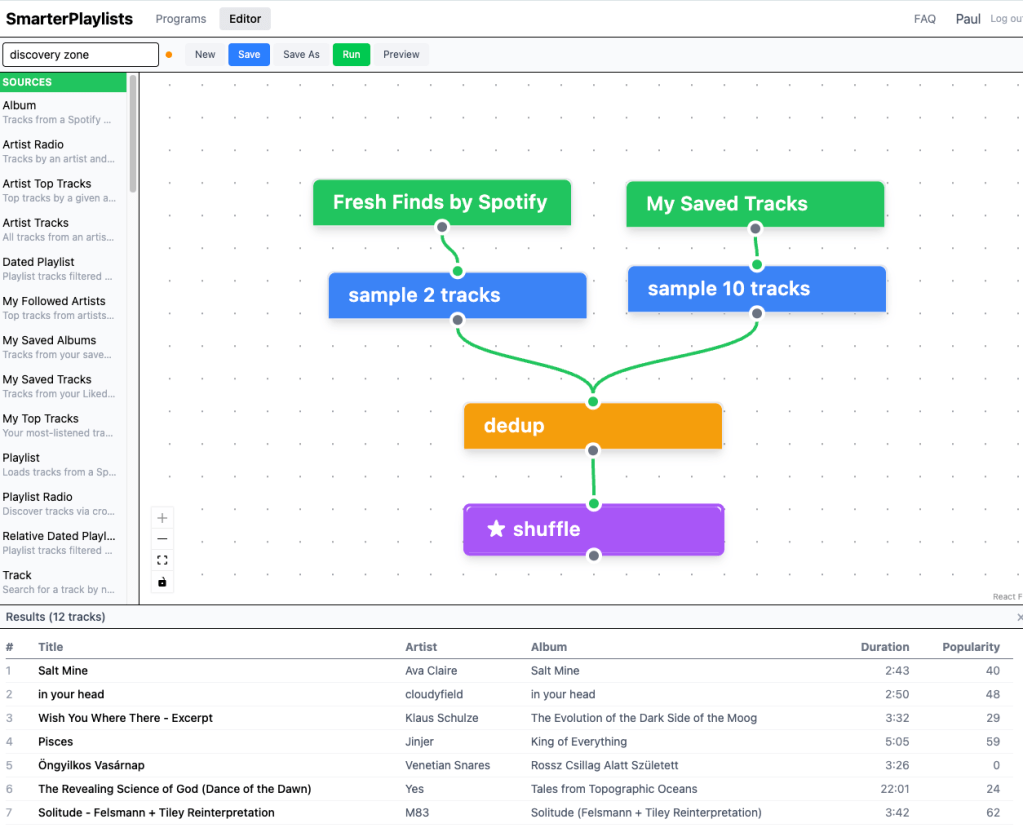
Here’s all you need for a working program called “My top tracks playlist”: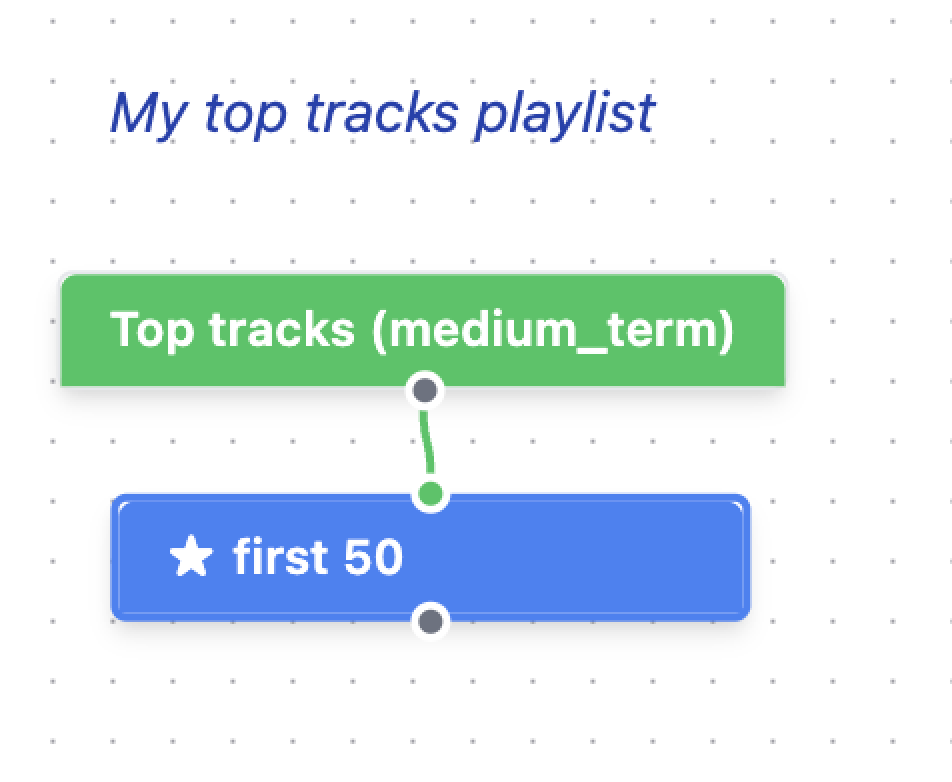
That’s it. Hit run, and you’ll find a Spotify playlist called “My top tracks playlist” with your 50 top tracks in it. Run it again tomorrow, and it updates the same playlist.
So what goes wrong?
If you add a “Save to Playlist” component at the end, things start to get confusing: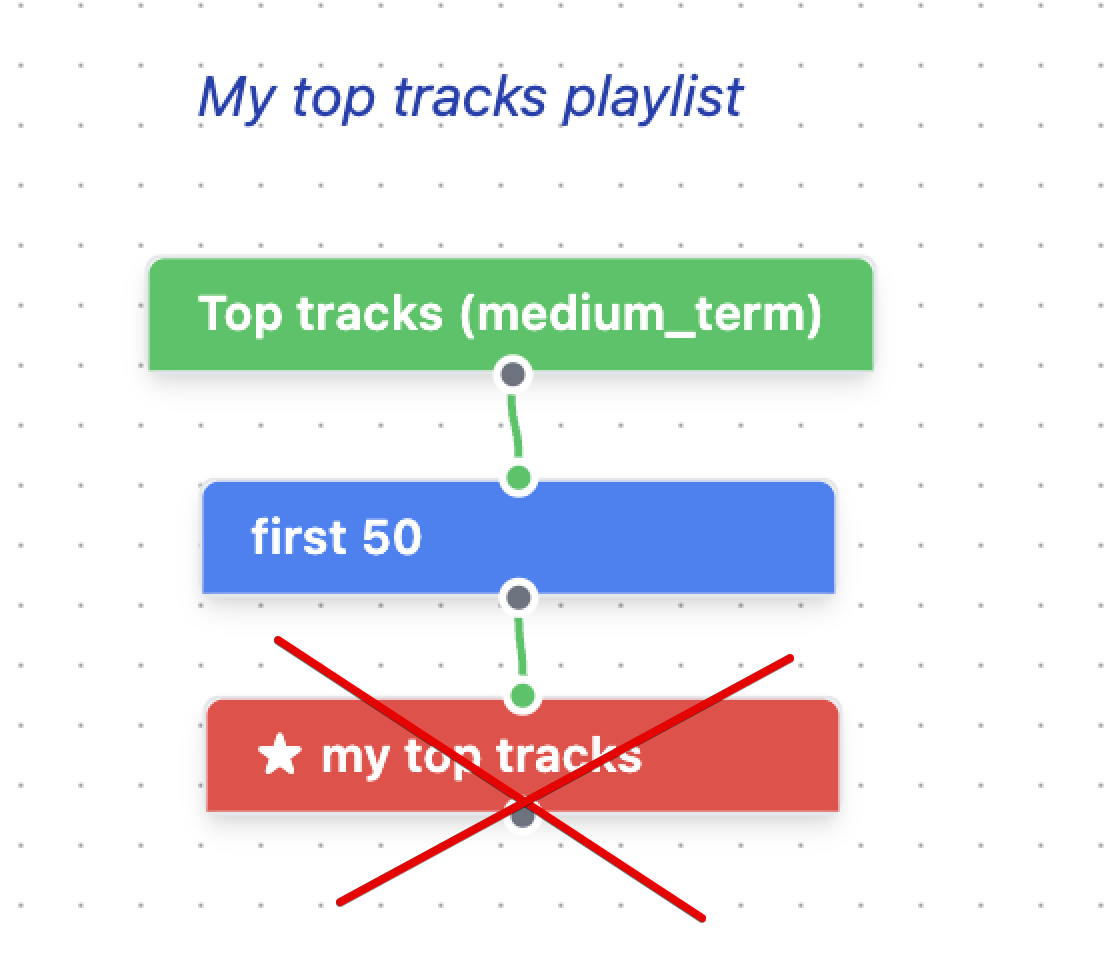
Now when you run the program, you get two playlists — one from the automatic save (named after your program) and one from the Save to Playlist component (with whatever name you gave it). Run it a few times and you might end up with a growing collection of playlists you didn’t expect.
This is the #1 source of “why do I have so many playlists?” questions.
Why does it work this way?
I’ll admit the design is a bit counterintuitive. But there are real advantages:
- Less clutter. Every one of the thousands of programs people have built would need an extra component at the end if saving weren’t automatic. That’s a lot of unnecessary nodes on a lot of canvases.
- Easy debugging. See that star on the “first 50” component in the first screenshot? You can move that star to any component in your program to preview its output. Want to see what your tracks look like before filtering? Star that node and run. This works because any node can be the output — there’s no requirement to wire everything through a save component.
- Simpler programs. Beginners can drop in a single source component, run it, and immediately see results. The less ceremony, the better.
When do you need Save to Playlist?
The Save to Playlist component exists for a specific (and pretty rare) use case: saving a side branch of your program to a separate playlist. Maybe you have a complex program that filters tracks in several stages, and you want to capture an intermediate result to its own playlist for reference. Or you want to keep track of all the tracks that were ever put into the playlist to use it as a track filter. That’s when Save to Playlist earns its place.
For everything else — which is the vast majority of programs — just build your pipeline, star the final component, and hit run.
Looking ahead
I’ll be honest: this is confusing enough that I’m exploring whether there’s a better design. Maybe a clearer visual indicator of “this is your output” would help, or a different approach to how saving works entirely. If you have ideas, I’d love to hear them.
But for now, the rule is simple: skip the Save to Playlist component. Your program’s output is already being saved for you.
SmarterPlaylists by the Numbers — A Decade in Review
SmarterPlaylists launched on July 25, 2015 as a side project — a visual programming tool that let anyone wire together Spotify sources, filters, and combiners to build playlists that no single Spotify feature could create on its own. No ads, no business model, no growth team. Just a tool I thought was cool, shared on a few subreddits, and then left running on a single server for over ten years.
Now, as I’m retiring the old system and replacing it with a ground-up rewrite, I cracked open the database one last time to see what a decade of quiet, organic usage actually looks like. The data only goes back to early 2016 (the first ~6 months predate the current database), but even so, the numbers surprised me.
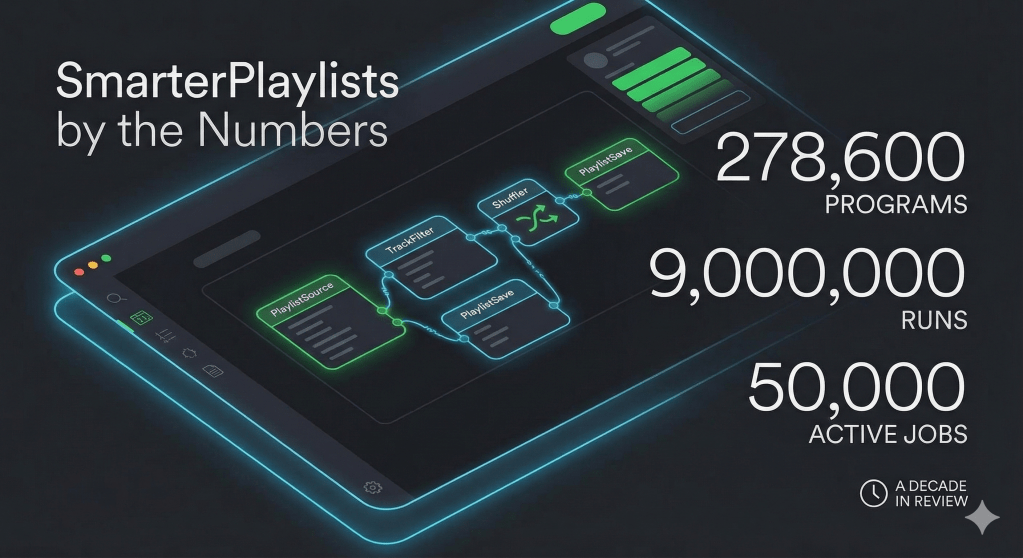
The headline stats: 262,000 people logged in over the years. Nearly 70,000 of them built something. They created 278,600 programs and ran them over 9 million times. More than 50,000 scheduled jobs were still marked “active” when I pulled the plug — playlists that were meant to refresh themselves daily, weekly, or monthly, faithfully updating for years.
Not bad for a weekend project that never got a v1.0.
The Big Picture
| Metric | Value |
|---|---|
| Total programs created | 278,600 |
| Total unique users who built programs | 69,562 |
| Users who ever authenticated | 262,181 |
That gap between “authenticated” (262K) and “built something” (70K) is interesting — nearly 75% of visitors logged in with Spotify, poked around, and left without saving a program. The visual programming interface was powerful but had a steep learning curve. That’s one of the biggest things the rewrite aims to fix.
Run Statistics
| Metric | Value |
|---|---|
| Total program runs (all time) | 9,029,034 |
| Total errors | 643,645 |
| Error rate | 7.1% |
| Programs run at least once | 205,984 (74%) |
| Programs never run | 72,616 (26%) |
| Mean runs per program (of those run) | 43.8 |
| Median runs per program | 4 |
| Max runs (single program) | 68,351 |
Nine million runs. That’s roughly 2,500 playlist generations per day on average, every day, for ten years — all from a single server.
The median of 4 runs tells the real story though: most people built a program, ran it a few times to get it right, then either scheduled it or moved on. Meanwhile the mean of 43.8 is dragged way up by power users running programs tens of thousands of times via the scheduler. The gap between mean and median is the signature of a long-tail product.
A 7.1% error rate sounds high, but most errors were transient Spotify API issues — rate limits, expired tokens, playlists that got deleted. The system was designed to shrug these off and retry on the next scheduled run.
Sharing & Discovery
| Metric | Value |
|---|---|
| Shared programs (marked public) | 4,707 |
| Programs imported at least once | 2,488 |
| Total imports across all programs | 53,879 |
Sharing was always a secondary feature — there was no feed, no recommendations, just a “shared programs” page and the occasional Reddit post. Despite that, 53,879 imports means the average shared program that got any traction was imported about 22 times. The most popular one was imported over 5,000 times. Word of mouth carried the whole thing.
Scheduler
| Metric | Value |
|---|---|
| Total scheduled jobs ever created | 56,629 |
| Currently active scheduled jobs | 50,234 |
| Total scheduled runs | 1,914,294 |
This is the feature that kept SmarterPlaylists alive. Nearly 2 million automated playlist updates — your “Discover Weekly Archive” growing every Monday, your “Daily Mix minus songs I’ve already heard” refreshing every morning. Over 50,000 jobs were still marked “active” when I shut things down, though many of those had stale tokens. The scheduler was the heartbeat of the app.
User Distribution
| Programs per User | Users | % |
|---|---|---|
| 1 | 47,031 | 68% |
| 2–5 | 18,595 | 27% |
| 6–10 | 2,474 | 4% |
| 11–50 | 1,350 | 2% |
| 50+ | 112 | 0.2% |
A classic power-law distribution. Two thirds of users built exactly one program. But that top 0.2% — 112 users with 50+ programs each — they were prolific. The most prolific user created 693 programs. That’s not a user, that’s a hobbyist playlist factory.
Activity Timeline
SmarterPlaylists launched July 25, 2015. The database only goes back to early 2016, so the first ~6 months of activity aren’t captured here.
| Earliest recorded run | 2016-01-03 |
| Latest recorded run | 2026-03-05 |
Programs Last Active by Year
| Year | Programs | % of Total |
|---|---|---|
| 2016 | 4,751 | 1.7% |
| 2017 | 9,185 | 3.3% |
| 2018 | 13,016 | 4.7% |
| 2019 | 12,176 | 4.4% |
| 2020 | 21,032 | 7.5% |
| 2021 | 16,290 | 5.8% |
| 2022 | 15,463 | 5.6% |
| 2023 | 13,094 | 4.7% |
| 2024 | 11,740 | 4.2% |
| 2025 | 12,721 | 4.6% |
| 2026 | 5,302 | 1.9% |
The COVID bump is unmistakable — 2020 saw a 73% jump over 2019. People stuck at home, listening to more music, and apparently building more elaborate playlists. Usage never quite returned to that peak, but it stabilized at a healthy plateau from 2021 onward rather than falling off a cliff. Even in 2025, over 12,000 programs were still actively running — ten years after launch.
Monthly Active Users (last 36 months)
Note: “MAU” here represents users whose program’s most recent run falls in that month. True monthly active usage was likely higher, since this only captures the last run timestamp per program — a program run daily all year only shows up in its final month.
| Month | Users | Programs |
|---|---|---|
| 2023-04 | 761 | 1,086 |
| 2023-05 | 884 | 1,324 |
| 2023-06 | 725 | 1,137 |
| 2023-07 | 780 | 1,338 |
| 2023-08 | 660 | 981 |
| 2023-09 | 694 | 1,069 |
| 2023-10 | 717 | 1,051 |
| 2023-11 | 713 | 1,028 |
| 2023-12 | 383 | 611 |
| 2024-01 | 638 | 1,134 |
| 2024-02 | 662 | 1,046 |
| 2024-03 | 586 | 847 |
| 2024-04 | 669 | 941 |
| 2024-05 | 656 | 1,010 |
| 2024-06 | 664 | 1,005 |
| 2024-07 | 579 | 960 |
| 2024-08 | 652 | 959 |
| 2024-09 | 639 | 1,022 |
| 2024-10 | 674 | 938 |
| 2024-11 | 627 | 885 |
| 2024-12 | 693 | 993 |
| 2025-01 | 706 | 1,266 |
| 2025-02 | 587 | 961 |
| 2025-03 | 693 | 1,096 |
| 2025-04 | 683 | 966 |
| 2025-05 | 691 | 939 |
| 2025-06 | 724 | 1,633 |
| 2025-07 | 691 | 1,112 |
| 2025-08 | 638 | 900 |
| 2025-09 | 658 | 1,012 |
| 2025-10 | 643 | 1,096 |
| 2025-11 | 509 | 926 |
| 2025-12 | 351 | 814 |
| 2026-01 | 232 | 547 |
| 2026-02 | 908 | 2,917 |
| 2026-03 | 539 | 1,838 |
The remarkably steady ~600-700 MAU through 2024-2025 is striking for a project with zero marketing. December always dips (holiday lull?), and February 2026 spikes because I started publicly talking about the retirement and migration, which brought a wave of people back.
Top 25 Most Prolific Users (by program count)
| Rank | User | Programs | Total Runs |
|---|---|---|---|
| 1 | User A | 693 | 2,115 |
| 2 | User B | 387 | 7,183 |
| 3 | Julio | 379 | 4,690 |
| 4 | User C | 367 | 36,068 |
| 5 | User D | 353 | 59,331 |
| 6 | User E | 268 | 25,662 |
| 7 | User F | 221 | 661 |
| 8 | User G | 196 | 11,901 |
| 9 | Hunter | 190 | 4,393 |
| 10 | User H | 172 | 477 |
| 11 | Nipun | 163 | 10,078 |
| 12 | Thomas | 154 | 11,994 |
| 13 | User I | 148 | 8,149 |
| 14 | User J | 144 | 18,153 |
| 15 | User K | 142 | 9,867 |
| 16 | User L | 142 | 229,198 |
| 17 | User M | 139 | 800 |
| 18 | User N | 136 | 32,002 |
| 19 | User O | 135 | 4,583 |
| 20 | User P | 135 | 1,054 |
| 21 | User Q | 134 | 5,682 |
| 22 | plamere | 131 | 1,404 |
| 23 | User R | 127 | 169,251 |
| 24 | User S | 126 | 9,436 |
| 25 | User T | 119 | 38,211 |
There’s a fascinating split here between “builders” and “runners.” User A created 693 programs but only ran them 2,115 times — about 3 runs each on average. They were a tinkerer, endlessly experimenting. User L, on the other hand, had 142 programs but ran them 229,198 times — these were workhorse playlists, scheduled and running daily for years. Two very different ways to love the same tool.
Top 25 Power Users (by total runs)
| Rank | User | Total Runs | Programs | Errors |
|---|---|---|---|---|
| 1 | Tim | 330,997 | 110 | 35,122 |
| 2 | User L | 229,198 | 142 | 3,567 |
| 3 | User R | 169,251 | 127 | 7,963 |
| 4 | User D | 59,331 | 353 | 3,622 |
| 5 | User U | 49,040 | 20 | 1,090 |
| 6 | Kjell | 39,445 | 42 | 1,397 |
| 7 | User T | 38,211 | 119 | 1,517 |
| 8 | User V | 37,386 | 109 | 2,940 |
| 9 | User W | 37,248 | 33 | 1,374 |
| 10 | User C | 36,068 | 367 | 928 |
| 11 | User X | 35,765 | 29 | 1,851 |
| 12 | User N | 32,002 | 136 | 3,520 |
| 13 | User Y | 31,507 | 83 | 1,206 |
| 14 | User Z | 29,753 | 64 | 721 |
| 15 | User AA | 28,050 | 14 | 1,103 |
| 16 | User BB | 27,167 | 41 | 381 |
| 17 | User CC | 27,023 | 42 | 796 |
| 18 | Fredrik | 26,578 | 115 | 1,782 |
| 19 | User DD | 26,177 | 92 | 567 |
| 20 | User EE | 25,725 | 31 | 908 |
| 21 | User E | 25,662 | 268 | 1,260 |
| 22 | User FF | 25,201 | 12 | 1,421 |
| 23 | John | 24,378 | 71 | 1,208 |
| 24 | Roger | 24,024 | 19 | 733 |
| 25 | User GG | 22,456 | 33 | 1,120 |
Tim is in a league of his own: 330,997 total runs across 110 programs. That’s roughly 90 program runs per day sustained over years. His top 5 programs alone account for nearly 280,000 runs. Whatever Tim was doing with his music, he was serious about it.
User AA is the efficiency champion — only 14 programs, but 28,050 runs. That’s 2,004 runs per program on average. Build it once, run it forever.
Top 25 Most Run Programs
| Rank | Program | Owner | Runs |
|---|---|---|---|
| 1 | #random.select | Tim | 68,351 |
| 2 | #random.bucket | Tim | 68,265 |
| 3 | #random.listening.year | Tim | 66,119 |
| 4 | #nine | Tim | 39,852 |
| 5 | #random.release.year | Tim | 36,953 |
| 6 | (unnamed) | (unknown) | 29,850 |
| 7 | (unnamed) | (unknown) | 27,741 |
| 8 | moetjehoren002 | User U | 24,510 |
| 9 | (unnamed) | (unknown) | 22,160 |
| 10 | (unnamed) | (unknown) | 19,337 |
| 11 | (unnamed) | (unknown) | 16,626 |
| 12 | (unnamed) | (unknown) | 16,067 |
| 13 | (unnamed) | (unknown) | 13,020 |
| 14 | Today Artists | User R | 11,908 |
| 15 | Songs V2a | User HH | 10,617 |
| 16 | A list | User GG | 10,399 |
| 17 | (unnamed) | (unknown) | 10,203 |
| 18 | Combined Lists | User AA | 10,131 |
| 19 | (unnamed) | (unknown) | 10,048 |
| 20 | (unnamed) | (unknown) | 9,660 |
| 21 | Made For You | User AA | 9,526 |
| 22 | (unnamed) | (unknown) | 9,206 |
| 23 | (unnamed) | (unknown) | 8,823 |
| 24 | (unnamed) | (unknown) | 8,150 |
| 25 | my super mix | Rodolfo | 8,123 |
Tim’s top 5 programs owned the leaderboard so completely that the next contender had less than half his #1’s run count. The #random.* naming convention suggests he built a suite of randomization programs — different ways to shuffle his listening by bucket, era, or mood.
A lot of the heavy hitters are “(unnamed) / (unknown)” — these are programs from early in the app’s life, before I started tracking names and owners in metadata. The programs themselves still exist, but the metadata was lost. Ghost playlists, faithfully running for years with no name attached.
Top 25 Most Popular Shared Programs (by imports)
| Rank | Program | Owner | Imports | Runs |
|---|---|---|---|---|
| 1 | My forgotten tracks | User II | 5,054 | 8 |
| 2 | My Discovery Weekly Archiver | plamere | 4,853 | 60 |
| 3 | yesterday and today | plamere | 3,400 | 27 |
| 4 | The daily dozen | plamere | 3,292 | 1 |
| 5 | All Time Top Tracks | Abhishek | 2,326 | 97 |
| 6 | Combine two playlists | plamere | 2,186 | 20 |
| 7 | True Release Radar | James | 1,529 | 244 |
| 8 | Ultimate Coffee House | plamere | 1,287 | 7 |
| 9 | Less Teen-Oriented New Music | plamere | 1,096 | 1 |
| 10 | My forgotten tracks | plamere | 987 | 116 |
| 11 | My Top Played Tracks of All-Time | User JJ | 787 | 149 |
| 12 | Shuffler | User KK | 769 | 5 |
| 13 | BigMix | User LL | 743 | 351 |
| 14 | Recommended Daily (posted) | User J | 684 | 29 |
| 15 | DailyRec | User LL | 663 | 469 |
| 16 | Daily Discover | User MM | 641 | 277 |
| 17 | Gothic Metal front-loaded with Ravenscry | plamere | 615 | 4 |
| 18 | RELAXING MUSIC PLAYLIST GENERATOR | User NN | 553 | 16 |
| 19 | My Discovery Weekly Archiver | User OO | 506 | 51 |
| 20 | Bot-Mix | User J | 502 | 0 |
| 21 | Will they make it? | User PP | 455 | 448 |
| 22 | My Top Tracks | User J | 422 | 1 |
| 23 | Workout | User QQ | 415 | 3 |
| 24 | recently played | plamere | 411 | 2 |
| 25 | Cleaning List | User RR | 391 | 81 |
The sharing leaderboard tells you what people actually wanted from Spotify that they couldn’t get natively. The top hits are all utilities: archive your Discover Weekly before it disappears, combine playlists, deduplicate, filter out songs you’ve already heard. “My forgotten tracks” — a program that surfaces songs from your library you haven’t played in a long time — was the single most imported program at 5,054 imports, and User II only ever ran it 8 times themselves. They built it, shared it, and the community ran with it.
I’m a little proud that so many of my example programs (plamere) made it into the top 25. “Gothic Metal front-loaded with Ravenscry” at #17 is a personal favorite — 615 people apparently also wanted their gothic metal playlist to lead with Ravenscry. Niche appeal is still appeal.
25 Biggest Programs (by component count)
| Rank | Program | Owner | Components |
|---|---|---|---|
| 1 | bing-short | Dylan | 401 |
| 2 | h10 | User SS | 305 |
| 3 | h80 | User SS | 305 |
| 4 | h90 | User SS | 305 |
| 5 | hOld | User SS | 305 |
| 6 | h20 | User SS | 305 |
| 7 | h00 | User SS | 305 |
| 8 | h70 | User SS | 305 |
| 9 | Nirvana Radio v26 | User TT | 289 |
| 10 | Nirvana Radio v26 | User UU | 287 |
| 11 | import of Nirvana Radio v26 | User VV | 287 |
| 12 | Nirvana Radio v24 | User UU | 283 |
| 13 | Nirvana Radio v22 | User UU | 282 |
| 14 | Nirvana Radio v23 | User UU | 270 |
| 15 | Nirvana Radio v20 | User UU | 270 |
| 16 | Nirvana Radio v27.02 | User TT | 268 |
| 17 | Nirvana Radio v18 | User UU | 267 |
| 18 | Nirvana Radio v21 | User UU | 266 |
| 19 | Nirvana Radio v25 | User UU | 265 |
| 20 | Nirvana Radio v17 saturday | User UU | 261 |
| 21 | Nirvana Radio v17 | User UU | 261 |
| 22 | Nirvana Radio v19 | User UU | 257 |
| 23 | Rock Favourites | Tom | 254 |
| 24 | Groovy Artists | User WW | 252 |
| 25 | Die drei Schlafezeichen | User XX | 249 |
The biggest programs are a testament to user dedication (or obsession). Dylan’s “bing-short” tops the chart at 401 components — that’s a visual program with 401 nodes wired together on a canvas. I can barely imagine what that looks like.
But the real star here is User UU and their “Nirvana Radio” saga. They iterated through at least 27 versions of the same program, each one with 250-290 components, growing and refining it over time. Versions 17 through 27, spanning years. It was popular enough that User TT and User VV imported copies of it. That’s someone who turned SmarterPlaylists into an art form.
Most Used Component Types (across all programs)
| Rank | Component | Usage Count |
|---|---|---|
| 1 | SpotifyPlaylist | 352,807 |
| 2 | Sample | 59,253 |
| 3 | Shuffler | 59,138 |
| 4 | PlaylistSave | 53,270 |
| 5 | MyTopTracks | 52,261 |
| 6 | Concatenate | 49,843 |
| 7 | SpotifyArtistRadio | 44,560 |
| 8 | DeDup | 43,162 |
| 9 | ArtistTopTracks | 41,066 |
| 10 | MySavedTracks | 38,764 |
| 11 | AlbumSource | 37,538 |
| 12 | Sorter | 35,645 |
| 13 | comment | 34,670 |
| 14 | TrackFilter | 30,325 |
| 15 | Alternate | 28,736 |
| 16 | RelativeDatedSpotifyPlaylist | 28,338 |
| 17 | First | 25,567 |
| 18 | Mixer | 22,342 |
| 19 | AttributeRangeFilter | 20,625 |
| 20 | PlaylistSaveToNew | 17,150 |
| 21 | MyFollowedArtists | 15,442 |
| 22 | MixIn | 13,035 |
| 23 | RandomSelector | 12,129 |
| 24 | Energy | 11,675 |
| 25 | ReleaseDateFilter | 11,501 |
| 26 | ArtistDeDup | 11,219 |
| 27 | SeparateArtists | 9,974 |
| 28 | Tempo | 9,850 |
| 29 | Weighted Shuffler | 9,728 |
| 30 | DatedSpotifyPlaylist | 9,286 |
SpotifyPlaylist dominates at 352K uses — almost every program starts with “take this playlist as input.” The rest of the top 10 reads like a recipe: take a playlist, sample some tracks, shuffle them, remove duplicates, and save. That’s the core loop.
The “comment” component at #13 with 34,670 uses warms my heart. It does nothing — it’s just a sticky note on the canvas. But 34,000 times, people felt the need to annotate their programs with explanations. They were documenting their work, even in a visual tool, even when nobody else would see it.
Looking Back
Ten years, nine million runs, seventy thousand users, zero revenue. SmarterPlaylists was never a business — it was a proof of concept that escaped into the wild and found an audience of people who cared about their music enough to program their playlists.
The data tells a story of a long-tail product: most people tried it once, but those who got it really got it. Tim with his 330,000 runs. User UU with 27 versions of Nirvana Radio. The 50,000 scheduled jobs humming away in the background. The person who imported “My forgotten tracks” and rediscovered songs they’d loved and lost.
The new version aims to keep everything that made the old one special — the power, the flexibility, the “I can’t believe I can do this” moments — while making it approachable enough that more than 27% of visitors actually build something.
Here’s to the next decade.
(Thanks to Claude and Gemini for helping me write this post)
Migrate your legacy SmarterPlaylists programs to the new system.
If you used the original SmarterPlaylists, your programs are still out there — and now you can bring them into the new system.

How it works
When you log in, you’ll see an Import tab if you have legacy programs. This gives you a browsable list of all your old programs with metadata like run count, last run date, and component count.
From here you can:
- Browse your old programs in a sortable table
- Preview any program to see its dataflow graph before importing
- Selectively import just the ones you want — check a few boxes and hit Import
- Bulk import everything at once if you prefer
Imported programs show up in your regular Programs list, ready to edit and run. Once you’ve imported everything you need, hit “Done Importing” to hide the tab. You can always bring it back later from the Programs page.
Some things to know
Deprecated components. The original SmarterPlaylists had EchoNest-based components (Artist Radio, Genre Radio, etc.). EchoNest was shut down years ago, so these components are marked as deprecated in the migration. Programs that use them will still import, but those nodes will show a warning and won’t run. You can open the program in the editor and swap them out for Spotify equivalents.
Layout differences. The old editor used a horizontal left-to-right flow. The new editor uses a vertical top-to-bottom layout. The migration tool rotates and rescales your node positions automatically, so your programs should look reasonable in the new editor — though you may want to tidy up the layout after importing.
Expect some rough edges
Here’s the thing: with this migration tool, we’re going to have a lot more variety in the programs people are running. The alpha has been tested with programs built in the new editor, but legacy programs exercise the system in ways we haven’t necessarily anticipated — unusual component combinations, edge cases in filters and sorters, parameter values we didn’t think to test.
This is a good thing. It means we’ll find and fix bugs faster. But it also means you might hit errors that nobody has seen before. If something breaks, please report it in the bugs thread — and if you include the program name and your spotify username it will be easier for me to chase down the bugs.
SmarterPlaylists is still in alpha. Your patience and bug reports are what make it better.
Better runtime stats in SmarterPlaylists
Like any other programming environment, SmarterPlaylists needs to help its programmers debug their programs, otherwise, the only debugging tool will have is thinking. And that’s often not good enough. With this in mind, I’ve pushed out an update to SmarterPlaylists that gives you detailed info on your run including: how many API calls were made across the whole run and for each component; how many tracks flowed through each component, cache hits, time spent waiting for the API to return, and more.
Here’s a screenshot of a simple program that grabs tracks from 3 playlists, combines them into a single alternating list of tracks, filtering them to keep only those that were released in this decade, and have lower energy. The stats section shows all the details – like the ‘alternate’ component is responsible for the most API calls since it is responsible for decorating the tracks.
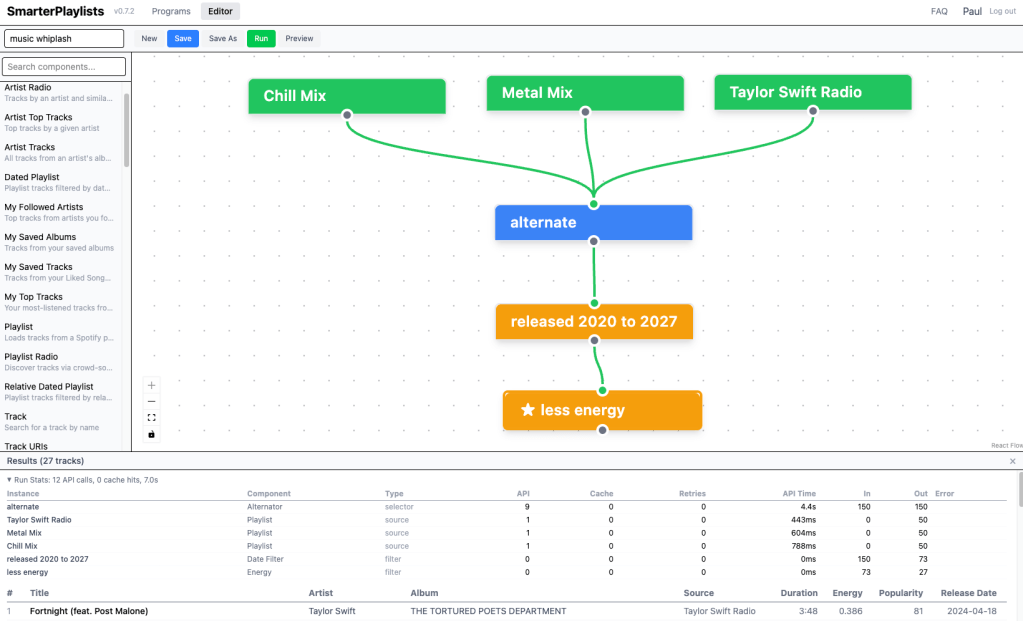
With these stats I’ve already found and fix bugs in the engine – so its already paying off.
SmarterPlaylists Alpha 0.1 is ready to make your playlists
Hey everyone — SmarterPlaylists is back online at smarterplaylists.playlistmachinery.com
As some of you know, the old version went offline a while back due to Spotify’s API auth changes. Rather than patch the old system, I’ve done ground-up rewrite with a modern stack.
What works:
- The visual graph editor for building programs
- Most of the components you know — sources, filters, combiners, sorters, conditionals, and outputs (51 components total)
- Running programs and auto-saving output to Spotify playlists
- Scheduling programs for automatic updates
What’s missing:
- Program sharing/importing
- Documentation and tutorials (but y’all know how it works, so you won’t need these …)
- General polish
What about my old programs?
I still have the old program data and the plan is to migrate them over, but I haven’t written the migration scripts yet. The component system has changed enough that it’ll take some careful work to convert old programs correctly. I’ll post an update when that’s ready. In the meantime, you’ll need to recreate any programs you want to use.
Important caveats — this is an alpha:
- Programs you create now may not survive into the final release. The data model is still evolving and I may need to wipe the database before 1.0.
- Expect rough edges and the occasional bug
- If something breaks, let me know here.
That said, the core functionality is solid and the app is secure (proper OAuth, encrypted tokens, HTTPS). If you’ve been missing SmarterPlaylists, give it a spin and let me know how it goes.
Special thanks to all the folks who’ve pinged me on musicmachinery, twitter, bluesky, github, reddit, and email to tell me how much they’ve relied on SP over the years. It helped me decide it was worth the update.
Sort Your Music Gets an Update.
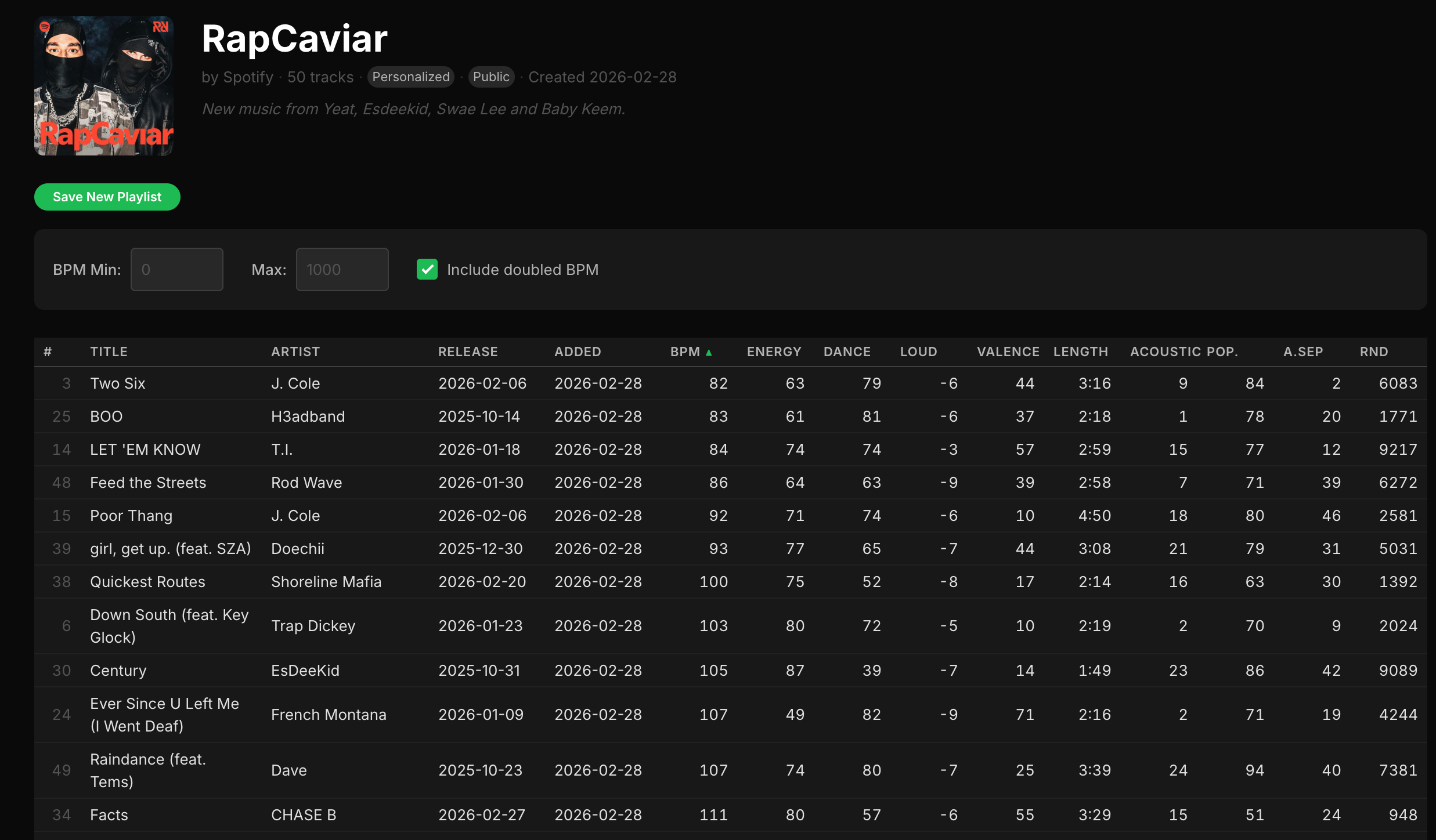
Sort Your Music has been helping people sort their Spotify playlists since 2012. Millions of playlists later, the app just got its first major rewrite. The core idea is the same — pick a playlist, sort by tempo or energy or danceability, save it back — but pretty much everything else is new.
Why Now?
Spotify updated their auth API to require HTTPS for all redirect URIs. Fair enough — it’s 2026, everything should be HTTPS. But that meant I needed a proper TLS setup, and the server Sort Your Music had been running on was a 10-year-old Linode instance that was getting increasingly painful to maintain. Upgrading the OS, patching dependencies, coaxing ancient packages into working with modern TLS — at some point it’s easier to just start fresh.
So that’s what happened. Spanking new server, spic and span secure endpoints. And once I was in there anyway, I figured the app itself deserved a refresh too. The original code was written in a single sitting in 2012 and it showed. The rewrite was also written in a single sitting — but this time Claude wrote all the code. I described what I wanted, reviewed what came back, and nudged things along. The whole thing came together in an afternoon.
Playlist Filtering
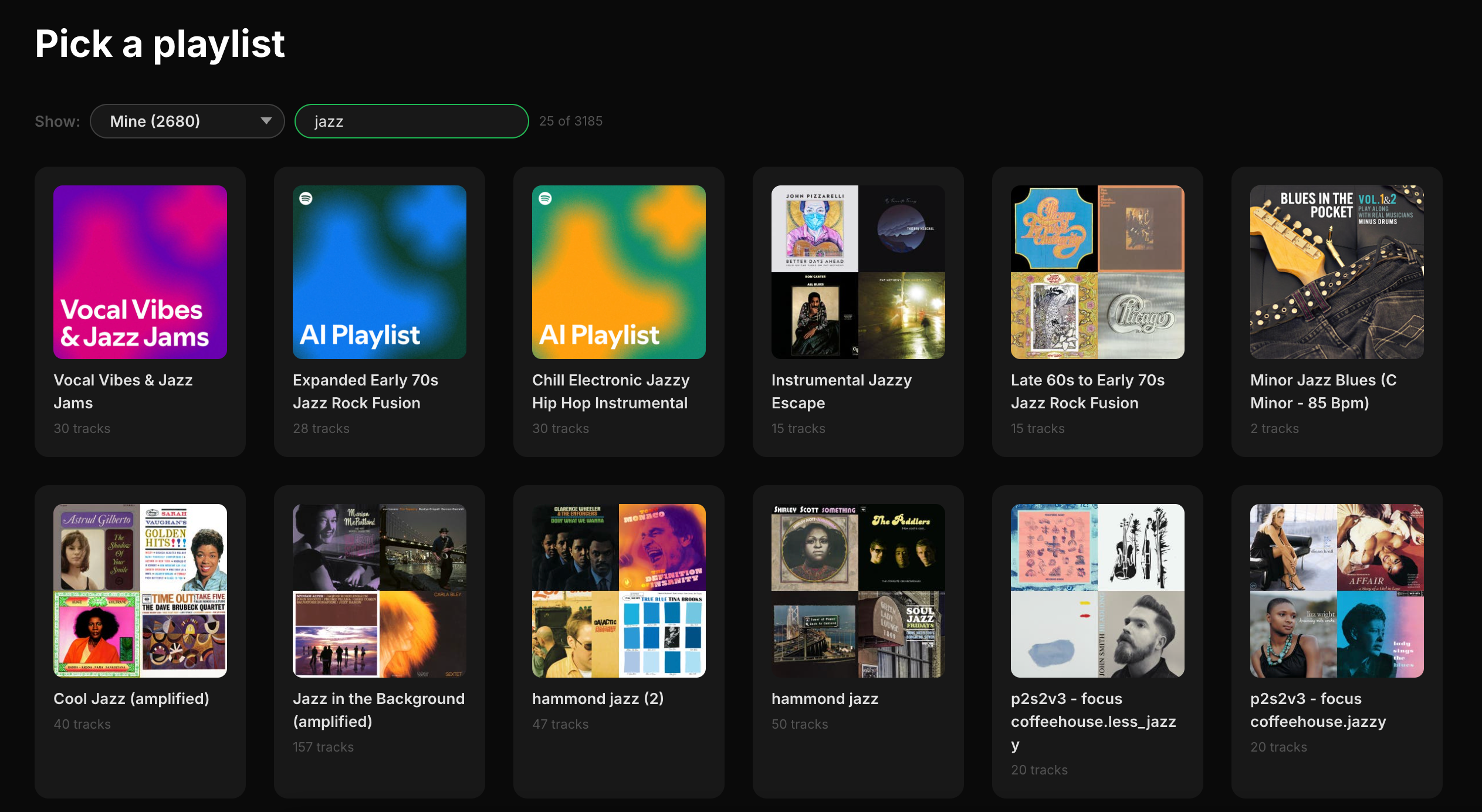
The biggest new feature is filtering. If you’re like me and have hundreds of playlists, scrolling through all of them to find the right one is a drag. Now you can filter by category:
- Mine — playlists you created
- Personalized — Spotify’s algorithmic playlists like Discover Weekly, Daily Mixes, and Release Radar
- Spotify — editorial playlists like Today’s Top Hits and RapCaviar
- Others — playlists by other users
- Collaborative — multi-user playlists
There’s also a search box for filtering by name, and a counter showing how many playlists match.
Podcast Episode Support
Spotify playlists can contain podcast episodes alongside tracks now. The old version choked on these. The new version handles them fine — episodes show up in the table (in italics), audio attributes like BPM and energy are just omitted since they don’t apply, and episodes are preserved when you save.
Richer Playlist Metadata
When you open a playlist, the header now shows cover art alongside the title, owner, track count, category, and creation date. Public and collaborative playlists get badges. If the playlist has a description, that shows up too. There’s also a new “Added” column showing when each track was added to the playlist.
Smarter Save Behavior
The save workflow got smarter. The app detects when a playlist is read-only (Spotify editorial playlists, Discover Weekly, etc.) and hides the “Overwrite” option, showing only “Save as New.” When you do save, the new playlist’s description notes how it was sorted. The button gives you a spinner during the save and a confirmation when it’s done.
Progressive Loading
Both playlists and tracks load incrementally now. A progress bar shows how far along things are, and items appear on screen as they arrive. Navigate away mid-load and the request gets properly cancelled — no more zombie API calls.
Modern Landing Page
The landing page makes it clear the app is open source and runs entirely in your browser. No data goes to any server other than Spotify’s.
Comprehensive FAQ
The FAQ got a big expansion — privacy policy, detailed explanations of each audio attribute, guidance on playlist categories, and a screenshot so you can see what the app looks like before committing to a login.
Under the Hood
The original was a product of its era: everything crammed into a single index.html, jQuery, Bootstrap 3, Underscore, DataTables, Q.js for promises. It worked, but it was very much 2012.
The rewrite is vanilla ES modules with zero runtime dependencies. The code is split into proper modules — views, utilities, API helpers, state management — but there’s still no build step or bundler. Edit a file, refresh the browser. Some things don’t need to change.
Auth moved from Spotify’s now-deprecated implicit grant flow to Authorization Code with PKCE, which is more secure and supports refresh tokens. No more re-authenticating every hour.
The CSS uses custom properties for theming with a Spotify-inspired dark palette, and the layout is responsive down to mobile.
Try It
Sort Your Music is live at sortyourmusic.playlistmachinery.com. The source is on GitHub.
Playing with strudel
I’ve been lurking in the live coding world for a few years. I’ve been re-inspired by Strudel. It’s a no-install javascript-centric version of Tidal Cycles that fits into my brain better than the Haskell-derived Tidal every did. I’ll be posting some of my experiments at Music Machinery on the Bear Blog.
Music Machinery on Substack
I fondly recall the Google Reader days when lots of folks were reading long form content. With the demise of Google Reader, and the rise of Twitter, TikTok and Instagram, long form content drifted into the background. But it may be coming back, thanks at least in part, to Substack. I’m going to give Substack a try, so you’ll find new content posted at musicmachinery.substack.com.
My favorite blog post of all time
I’ve been reading blogs seemingly forever. I’ve read lots of great posts .. but there’s one blog post that I still think about all the time even though it is nearly 5 years old. It’s by Sascha Judd and its all boy bands and the diversity crisis in tech. It’s a must read: How The Tech Sector Could Move In One Direction.


Someday I may get back to organizing tech events – and when I do, I’ll be thinking about better ways to engage with fan armies.

